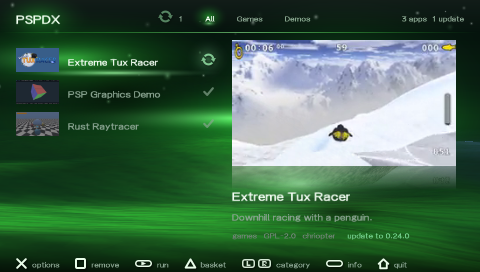
Catalog JSON
{
"id": "io.github.chriopter.pspdxapp",
"source": "https://github.com/chriopter/pspdx-app",
"name": "PSPDX",
"category": "app",
"installdir": "PSP/GAME/PSPDX",
"summary": "Download, run and update homebrew on your PSP.",
"author": "chriopter",
"license": "GPL-2.0-only",
"releases": [
{
"tag": "v2.5.0",
"published_at": "2026-11-12T21:51:06Z",
"url": "https://github.com/chriopter/pspdx-app/releases/download/v2.5.0/pspdx.zip",
"size": 1967484,
"sha256": "daf0790342f2e1a2f838723bf9b5eb667141c313673892a4727870c3b861f7c0",
"eboot_md5": "dfc1ca9dcbd2644fb89a72eaffcb4fa7",
"changelog": "PSPDX 2.5 📶 Never lose the connection without knowing:\n\n- 🌐 **Reconnect first**: when Wi-Fi drops (standby, out of range), the store and the UMDs start with a Reconnect tile, in the list and in the icons alike\n- 💤 **After standby**: PSPDX notices at once that the radio went down, instead of fetches that quietly fail\n- 🔄 **Auto Connect rejoins**: with Auto Connect on, the connection comes back by itself in the background, no dialog; the globe breathes while it joins\n- ⏸️ **Downloads wait**: a download that broke off holds on until the connection is back, then goes on where it stopped\n- ✨ **Auto Connect offered**: after your first connection through the system's dialog, PSPDX asks once whether to connect by itself from now on\n\nDownload `pspdx.zip`, extract it onto your Memory Stick, or update inside PSPDX."
},
{
"tag": "v2.4.0",
"published_at": "2026-11-09T19:00:45Z",
"url": "https://github.com/chriopter/pspdx-app/releases/download/v2.4.0/pspdx.zip",
"size": 1964837,
"sha256": "74105a50f2476fed711ef73f2dedeea7cd04867644ed683cd542fafd9fc904c8",
"eboot_md5": "48a9327c325c454166329616476ea298",
"changelog": "PSPDX 2.4 🗂️ Find your games faster:\n\n- 🔀 **Icons or list**: SELECT switches the store, the UMDs and the launcher between a grid of icons and a list\n- 🎭 **UMD genres**: browse your discs by genre (Sports, RPG, Racing…), with a pspdx-shelf that knows them\n- 🔍 **Search everywhere**: the list view of the UMDs and the launcher starts with Search\n- 📚 **Launcher list**: Favorites, PSP Games, PS1 Games and Homebrew as rows you open\n\nDownload `pspdx.zip`, extract it onto your Memory Stick, or update inside PSPDX."
},
{
"tag": "v2.3.0",
"published_at": "2026-11-08T20:37:12Z",
"url": "https://github.com/chriopter/pspdx-app/releases/download/v2.3.0/pspdx.zip",
"size": 1960467,
"sha256": "246dd7ffcae2b90550da3376d15b072e39044170c12c70f9be636cbe5424e7fa",
"eboot_md5": "3959c3f3fe4f7f63b6ddd6a0ca8f274b",
"changelog": "PSPDX 2.3 💪 Downloads that don't give up:\n\n- 🔁 **Resume**: a download that breaks off picks up where it stopped, even after a restart\n- 🌊 **No more waves**: the Memory Stick writes while the next bytes arrive\n- ⏱️ **Time left**: a steady speed and the minutes still to go\n- 💾 **Free space**: how much room is left on your Memory Stick while you download\n- △ **Launcher menu**: Start, Favorite or Delete a game right from the launcher\n\nDownload `pspdx.zip`, extract it onto your Memory Stick, or update inside PSPDX."
},
{
"tag": "v2.2.0",
"published_at": "2026-11-08T19:30:32Z",
"url": "https://github.com/chriopter/pspdx-app/releases/download/v2.2.0/pspdx.zip",
"size": 1956861,
"sha256": "2b278badd97a8c8df82ed18447dde988d2667c390cec7de49aaadd44abbe54bc",
"eboot_md5": "ff813c0bdf79ee583cb29be44cfd95d0",
"changelog": "PSPDX 2.2 🏠 A launcher that feels like home:\n\n- 🏠 **Launcher**: all your games in one list, each kind starting with its sign; X or START starts right away\n- ⭐ **Favorites**: press □ and a game moves to the very front\n- 🧭 **New tabs**: Store, Launcher and UMDs in the middle; basket, updates and settings on the right\n- 📶 **No Wi-Fi popup at start**: what you fetched last shows at once; Connect when you want new stuff\n- 🔄 **Auto Connect**: pick a network once, PSPDX connects in the background on every start\n- 🌐 **Network menu**: go online or offline, Auto Connect, Sources, USBNet and Tailscale in one place\n- 🧹 **Tidier settings**: Launcher first, Autocache, Developer Mode; Renew TLS Seed now under Restore Defaults\n\nDownload `pspdx.zip`, extract it onto your Memory Stick, or update inside PSPDX."
},
{
"tag": "v2.1.0",
"published_at": "2026-11-08T17:19:52Z",
"url": "https://github.com/chriopter/pspdx-app/releases/download/v2.1.0/pspdx.zip",
"size": 1952261,
"sha256": "fc64cf2770b78eea05ba6665adc995dfc43a0ecf2a20af130afdb002f7e25dad",
"eboot_md5": "2cc55f9c22729062d8e61208eb097249",
"changelog": "PSPDX 2.1 🎮 Your PSP's games, one tap away:\n\n- 📚 **Library**: every game on your stick in the middle — PSP ISOs, PSN, PS1 and homebrew, with video previews; X starts it\n- 🚀 **Launcher**: turn it on under Options and your PSP boots straight into PSPDX (ARK); XMB takes you back to the home menu\n- ⚡ **Instant start**: no connection at start; the store and updates connect when you open them\n- 💿 **UMDs** from catalogs now live under Categories\n- 🌐 **Tailscale**: shows Error when the device is gone, reloads catalogs after setup\n- 🏎️ **Faster**: the UMD grid at 60 FPS again\n\nDownload `pspdx.zip`, extract it onto your Memory Stick, or update inside PSPDX."
},
{
"tag": "v2.0.0",
"published_at": "2026-11-08T12:57:46Z",
"url": "https://github.com/chriopter/pspdx-app/releases/download/v2.0.0/pspdx.zip",
"size": 1954484,
"sha256": "4e5aa6c5170d5ae60c98da29b9c58c2c64462dc4b2f92187f677709e6d1768f1",
"eboot_md5": "6edcc430b3a811b71eca0bdc634e5b76",
"changelog": "PSPDX 2.0 🎉 Everything since 1.0:\n\n- 🌐 **Tailscale**: set up with `tunnel.txt`, on per source, Test and Remove\n- 💿 **UMDs**: grid with video previews and flags, install and start ISOs, [pspdx-shelf](https://github.com/chriopter/pspdx-shelf)\n- 🏠 **Your own catalogs**: over http://, with a password, Edit/Password/Tailscale/Test/Delete\n- ✨ **Looks**: full 480x272 backdrop, new music, SELECT sorting, sharp icons\n- 🔌 **Connections**: USBNet, remembered certificates, Archive.org, IP addresses on real hardware\n- 🚀 **Under the hood**: a third of the memory per app, errors stay on screen, tested on a real PSP\n\nDownload `pspdx.zip`, extract it onto your Memory Stick, or update inside PSPDX."
},
{
"tag": "v1.6.0",
"published_at": "2026-11-08T09:25:45Z",
"url": "https://github.com/chriopter/pspdx-app/releases/download/v1.6.0/pspdx.zip",
"size": 1877169,
"sha256": "5f959607aaba8d26e72e218c466139e463db81aecda01ea3a306b3f7c3fd7b37",
"eboot_md5": "922447abd7356ca81072df77e53a2fbd",
"changelog": "PSPDX 1.6.0\n\n- Many more apps fit in memory: every catalog entry takes a third of the room it did, so a large disc library next to the big homebrew lists loads whole.\n- Large catalogs are read one app at a time, without holding the whole list in memory at once while they load.\n\nDownload pspdx.zip, extract it onto your Memory Stick and launch PSPDX."
},
{
"tag": "v1.5.0",
"published_at": "2026-11-08T08:41:13Z",
"url": "https://github.com/chriopter/pspdx-app/releases/download/v1.5.0/pspdx.zip",
"size": 1876165,
"sha256": "de2ce8a4712701fee8f2eece2174f612fa5027eeeaa3276613f031e8a381baef",
"eboot_md5": "e1974512fdee851071099257e7e7bb12",
"changelog": "PSPDX 1.5.0\n\n- Catalogs behind a password: PSPDX asks for it when you add the source and remembers it. Under Sources, X on a source edits its address, sets its password or deletes it, so a typo no longer means deleting and typing it again.\n- The app page shows the game's picture behind everything at full 480x272, now also in the 60 FPS mode.\n- SELECT sorts by newest, by name or installed first; the hint fades once you scroll down.\n- The UMD grid loads all icons it shows and no longer peeks at the row below.\n- Updated pspkit-https to 0.2.10.\n\nDownload pspdx.zip, extract it onto your Memory Stick and launch PSPDX."
},
{
"tag": "v1.4.0",
"published_at": "2026-11-07T23:23:13Z",
"url": "https://github.com/chriopter/pspdx-app/releases/download/v1.4.0/pspdx.zip",
"size": 1872572,
"sha256": "e655dcd713b4f1f4a671ecb65d962dc1b87578555a4d003ebee3cea1a99fdb25",
"eboot_md5": "80fc74e73c20b899fc82bf18d8c8bb35",
"changelog": "PSPDX 1.4.0\n\n- Catalogs you host yourself can be plain http://, with no certificate: type the address with http:// and it stays that way. Their downloads are checked against the catalog's SHA-256.\n- A source that does not answer when you add it is saved anyway and tried again at every refresh, so you never type it twice. A self-signed https source then asks \"connect anyway?\" once.\n- Updated pspkit-https to 0.2.9.\n\nDownload pspdx.zip, extract it onto your Memory Stick and launch PSPDX."
},
{
"tag": "v1.3.2",
"published_at": "2026-11-07T22:22:01Z",
"url": "https://github.com/chriopter/pspdx-app/releases/download/v1.3.2/pspdx.zip",
"size": 1872525,
"sha256": "a9067e6e7361345c72d1e3089ffba3531a58d1f3838caa083ec9aa949c3519c9",
"eboot_md5": "0eed1c1e01b90a9eb437b0995e862923",
"changelog": "PSPDX 1.3.2\n\n- Start an installed ISO right from PSPDX: Run on its options, or X on its page, asks first and starts it through the custom firmware's ISO driver, as its game menu does.\n\nDownload pspdx.zip, extract it onto your Memory Stick and launch PSPDX."
},
{
"tag": "v1.3.1",
"published_at": "2026-11-07T22:09:22Z",
"url": "https://github.com/chriopter/pspdx-app/releases/download/v1.3.1/pspdx.zip",
"size": 1871963,
"sha256": "003350f5724764a2efeacf44ea0a36f7d14fad13dbbb0cda52f496a9a9b68438",
"eboot_md5": "5db66275deec739d66e1698f92c8d1e0",
"changelog": "PSPDX 1.3.1\n\n- Fixed deleting an installed ISO: it no longer says that the install location is unknown.\n- The app's data page names an ISO's file.\n\nDownload pspdx.zip, extract it onto your Memory Stick and launch PSPDX."
},
{
"tag": "v1.3.0",
"published_at": "2026-11-07T21:53:39Z",
"url": "https://github.com/chriopter/pspdx-app/releases/download/v1.3.0/pspdx.zip",
"size": 1872411,
"sha256": "debe5cc1ee2598e35588f47adaeddc518b0c30e7a29b00d6c195dc529d14e71f",
"eboot_md5": "08dd64a32e5a40c4ee742c960518330b",
"changelog": "PSPDX 1.3.0\n\n- UMDs: catalogs can list disc images. The UMD tab shows them as a grid of icons, one per game, with its regional versions as flags on the game's page.\n- Installs an ISO straight to ISO/ on the Memory Stick or the PSP Go's storage, checked against the catalog's SHA-256; start it from the PSP's game menu. Delete removes it again.\n- A certificate you accepted with \"connect anyway\" is remembered for that host, so you are asked once, not at every start. Updated pspkit-https to 0.2.8.\n- Long summaries from catalogs without a description are shown in full on the app's page.\n\nDownload pspdx.zip, extract it onto your Memory Stick and launch PSPDX."
},
{
"tag": "v1.2.3",
"published_at": "2026-10-22T10:50:41Z",
"url": "https://github.com/chriopter/pspdx-app/releases/download/v1.2.3/pspdx.zip",
"size": 1864954,
"sha256": "a73477e95699d40705ce9efb53f5a43a1a440dc965871056a8afbfe3c7aee20a",
"eboot_md5": "f42297af49f8d763ba46ab96e8f223f5",
"changelog": "PSPDX 1.2.3\n\n- Updated pspkit-https to 0.2.7 with Mozilla's October 20, 2026 trust store: 118 roots, removing three emSign roots.\n- Refreshes PSPDX-managed USBNet installations while preserving disabled plugins and custom files. Replacing a running plugin requires a full PSP restart.\n- Reports when Sony's network dialog cannot load, with module, firmware and connection diagnostics in the log. Normal cancellation remains quiet.\n\nIf network settings do not open in either PSPDX or XMB, the firmware may be missing Sony's network dialog module. A clean official firmware 6.61 installation followed by ARK-5 fixed the affected PSP Street; back up your data and follow the installation guide for your model."
},
{
"tag": "v1.2.2",
"published_at": "2026-10-20T09:02:28Z",
"url": "https://github.com/chriopter/pspdx-app/releases/download/v1.2.2/pspdx.zip",
"size": 1863912,
"sha256": "56a81ea1c61e671d5bfa17d4acffaf1d9b1e726143a01a46c1f7a7768ff167c9",
"eboot_md5": "86f49ca7f2f6f7fd3feed839d1e014df",
"changelog": "Network diagnostics now survive periodic performance telemetry. Saved logs include network initialization checkpoints and Sony connection dialog status changes to diagnose USBNet connection failures."
},
{
"tag": "v1.2.1",
"published_at": "2026-10-19T11:08:18Z",
"url": "https://github.com/chriopter/pspdx-app/releases/download/v1.2.1/pspdx.zip",
"size": 1864305,
"sha256": "8e5627a27296aa36448f0b03dc654cd0ebd892b5d3436f627c95d55606fd6683",
"eboot_md5": "79ee5bd16b5df1dd3923dcccfcb1edf6",
"changelog": "Fixed Archive.org downloads with pspkit-https 0.2.6.\n\n- Restored Archive TLS and decoded chunked metadata responses.\n- Recovered moved ZIPs and failed storage mirrors, preserving size and SHA-256 checks.\n- Restricted fallback hosts to genuine Archive.org subdomains.\n- Added a repeatable download audit with ten parallel PPSSPP instances.\n\nVerified all 1,764 current catalog payloads by size, SHA-256 and ZIP CRC.\n44 initial source errors were investigated and verified replacement URLs tested.\nSeven upstream catalog corrections are prepared separately; they are not bundled here.\n15 ZIPs with multiple equally shallow EBOOTs remain ambiguous for the installer.\n\nValidation: 186 client host tests, 13 certificate cases, request sanitizers,\n53 successful emulator installations and a separately linked library release ZIP."
},
{
"tag": "v1.2.0",
"published_at": "2026-10-15T18:41:25Z",
"url": "https://github.com/chriopter/pspdx-app/releases/download/v1.2.0/pspdx.zip",
"size": 1862116,
"sha256": "52750b2c13360749b8a96b9886168ad84819f5d6db32ec29ee1a1746d25f3851",
"eboot_md5": "74789132f596ffda065586df8a304950",
"changelog": "USB networking, a clearer setup screen.\n\n- Bundles USBNet 1.0, including PSP Street network-menu support.\n- Moves the USBNet preview below the explanation on the right, giving the menu label more room.\n- Keeps the familiar USB setup and connection flow.\n\nDownload pspdx.zip, extract it onto your Memory Stick and launch PSPDX."
},
{
"tag": "v1.1.5",
"published_at": "2026-10-07T18:16:05Z",
"url": "https://github.com/chriopter/pspdx-app/releases/download/v1.1.5/pspdx.zip",
"size": 1860399,
"sha256": "8b695e53f940a2b2f667f6a77fecf3c6a4f0ab05e1948f157b75b7fa3b65636b",
"eboot_md5": "f200197691d63134123e92949c7b4242",
"changelog": "### ✨ New\n\n- **Errors stay on screen.** A failure waits for X, with a small line under it to show us in a photo.\n- **Set up USBNet** under the gear: connect over the USB cable at any time, not only at the first start.\n- **One file.** The PSPDX folder holds just EBOOT.PBP; the font and the USB plugin are inside it.\n\n### 🛠 Fixed\n\n- PSPDX shows under its source again.\n- No more updates offered for an app that was just installed.\n- Updates are found even when the PSP's date is wrong.\n- Several plugins from INBOX: each one is asked about.\n\n### ✅ Tested\n\n100 runs on a real PSP-1000 (6.60 + ARK), all passed:\n- 25× first start over the USB cable until online\n- 25× USBNet install, on, off, delete\n- 25× install and delete an app from GitHub\n- 15× Run an installed app\n- 10× start with the built-in font\n\nThe font also in PPSSPP without firmware fonts.\n\nExtract `pspdx.zip` to your PSP storage, or update through PSPDX."
},
{
"tag": "v1.1.4",
"published_at": "2026-10-06T22:26:44Z",
"url": "https://github.com/chriopter/pspdx-app/releases/download/v1.1.4/pspdx.zip",
"size": 1854579,
"sha256": "48f0f8133d0def2be3c81b10ff35e2d4ba5a194e407e2451d7735cd792483fe7",
"eboot_md5": "565f74d075600239cc69a4d5aa72ee4e",
"changelog": "### 🛠 Fixed\n\n- **Start apps from PSPDX.** \"Run\" and the restart after an update did nothing in 1.1.0 to 1.1.3. Both work again, from the Memory Stick and from the PSP Go's System Storage.\n\nTested on PSP Go (6.60 + ARK).\n\nExtract `pspdx.zip` to your PSP storage, or update through PSPDX."
},
{
"tag": "v1.1.3",
"published_at": "2026-10-06T22:09:50Z",
"url": "https://github.com/chriopter/pspdx-app/releases/download/v1.1.3/pspdx.zip",
"size": 1854391,
"sha256": "01bbf498207279ac45fb3aab95ed1508affbec05c2ee7c1507d718584f5d497e",
"eboot_md5": "9b88283b6c361b779f3f27d0583852a8",
"changelog": "\n\n### ✨ New\n\n- **Online over the USB cable.** No Wi-Fi needed: choose \"USB cable\" at the first start and PSPDX sets up [USBNet](https://github.com/chriopter/pspkit-usbnet) for you.\n- **PSPDX finds the gateway.** It looks for the gateway on your PC and tells you where to get it if it is not running.\n- **Plugins.** Install, turn on and off, update and delete plugins right from the store.\n- **Faster downloads.** Up to twice as fast on a PSP Go.\n\n### 🛠 Fixed\n\n- **Run works again.** In 1.1.0 to 1.1.2 starting an app from PSPDX, and the restart after an update, did nothing.\n\nTested on PSP-1000 and PSP Go (6.60 + ARK).\n\nExtract `pspdx.zip` to your PSP storage, or update through PSPDX. [▶ The video in full quality](https://github.com/chriopter/pspdx-app/releases/download/v1.1.3/pspdx-usbnet-promo.mp4)"
},
{
"tag": "v1.0.4",
"published_at": "2026-10-04T19:26:26Z",
"url": "https://github.com/chriopter/pspdx-app/releases/download/v1.0.4/pspdx.zip",
"size": 1817481,
"sha256": "208d2d697be301447ac6d391ae2eecd862b53b0ce004f9758ffd93172cbcf546",
"eboot_md5": "5dfa41c4035b282ef1d8f78ecf872815",
"changelog": "Fixes the \"PSPDX failed / font: nothing loadable\" startup error in PPSSPP when flash0 font access fails.\n\n- Ships a free replacement font beside EBOOT.PBP and loads it when firmware fonts are unavailable.\n- Keeps firmware fonts as the first choice on real PSP hardware.\n- Includes the font in the release package and development launchers, with source and license information.\n\nValidation: PSP build, 156 client tests with address/undefined-behavior sanitizers, schema checks, and a successful PPSSPP 1.20.4 launch on a fresh Memory Stick without a debug font override.\n\nExtract pspdx.zip into your PSP or PPSSPP Memory Stick directory, preserving the full package."
}
],
"media": {
"icon": "apps/io.github.chriopter.pspdxapp/icon-b889c022.png",
"screenshots": [
"apps/io.github.chriopter.pspdxapp/picture-c1448a88.png"
],
"video": "apps/io.github.chriopter.pspdxapp/film-d825efeb.pmf",
"sound": "apps/io.github.chriopter.pspdxapp/sound-d241e56f.at3"
}
}